
User Tools
Table of Contents
Reservation Guest Workspaces and Meeting Rooms Gorlaeus Building
Introduction
A guest workspace or a meeting room in the Gorlaeus Building can be reserved yourself via the online reservation system “Shareddesk” or through the Observatory Secretariat (secretaries@strw.leidenuniv.nl). If you need to set up recurring (group) meetings every (other) week, please email the secretariat. You can, however, make a reservation (one slot at a time) yourself at max 1 month ahead of time.
Setup account for reservation
- Log in https://www.universiteitleiden.nl/shareddesk with your ULCN university credentials.

- You will probably see the following message “You are not assigned to any organization”.
- Please log out.
- Send a email to shareddesk@ufb.leidenuniv.nl and request to be linked to Gorlaeus Building Sterrewacht. They will give you the access to be able to make a reservation.
• After you have successfully logged in you will see the following message. Please click “Add to existing account”. 
- A new window opens stating you have an email in your (observatory) email box, which must be used to confirm your identity:
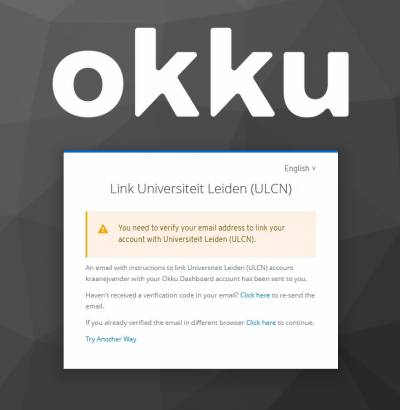
- In the email you find a link, copy/paste that into your browser and it will confirm your identity and take you into the reservation system.

Booking a Guest Workspace
You can only book guest workspaces at Sterrewacht offices on 3rd floor B-wing, 4th floor B-wing and 4th floor C-wing!
- Set the reservation date/time in the top selection box.
- If the meeting room is colored green, you can reserve it (gray = occupied, yellow = you have already reserved it). Click on the desk to confirm your reservation.
- An automatic email will be sent to you (no-reply@ufb.leidenuniv.nl) confirming your reservation.
Booking a Meeting Room
- Set the reservation date/time in the top selection box.
- If a meeting room is colored green, you can reserve it (gray = occupied, yellow = you have already reserved it). Click on the room to confirm your reservation.
- An automatic email will be sent to you (no-reply@ufb.leidenuniv.nl) confirming your reservation.
NB: Click the 'My Reservations' option in the top navigation bar to view all your reservations or manage them.


